access_restricted

Nathan Clinton

Senior Product Designer — portfolio

Need access? NathanMClinton@gmail.com

Charlotte, NC · Portfolio 2026

Nathan
Clinton

Senior Product Designer — I design products that make complex things feel simple.

5+ years designing end-to-end — from consumer product concepts to enterprise systems used thousands of hours a day. 16,000+ hours saved. Based in Charlotte, NC.

Section 02 — Work

Selected work

Four projects — three enterprise systems, one personal product concept. Each one skimmable in 30 seconds.

Enterprise work is shown as sanitized mockups and concept visualizations — these systems live behind the firewall.

Lowe's Internal Enterprise System · 2026

Assign Hub

Redesigning who-owns-what: the system that assigns people to product hierarchies.

Assign Hub governs ownership across merchandising — who is responsible for each category, product group, and assortment. The legacy application, built over 20 years ago, buried these critical decisions under outdated patterns and click-heavy workflows. I led the end-to-end redesign: wireframes through high-fidelity prototypes.

~60% faster
single assignment update: 195 seconds and 16 clicks → 80 seconds
75% less
weekly assignment workload: 15–20 hours → reduced by 75%
Role

Owned the end-to-end design process — wireframes through final UI and interactive prototyping. Used AI-accelerated exploration (Figma Make) to iterate rapidly. Made strategic feature-prioritization decisions, removing friction-heavy elements and enhancing core assignment workflows. Partnered with product and engineering to ensure feasibility and implementation readiness.

Internal Lowe's project — details available in interview settings.
assign_hub.ui users & items
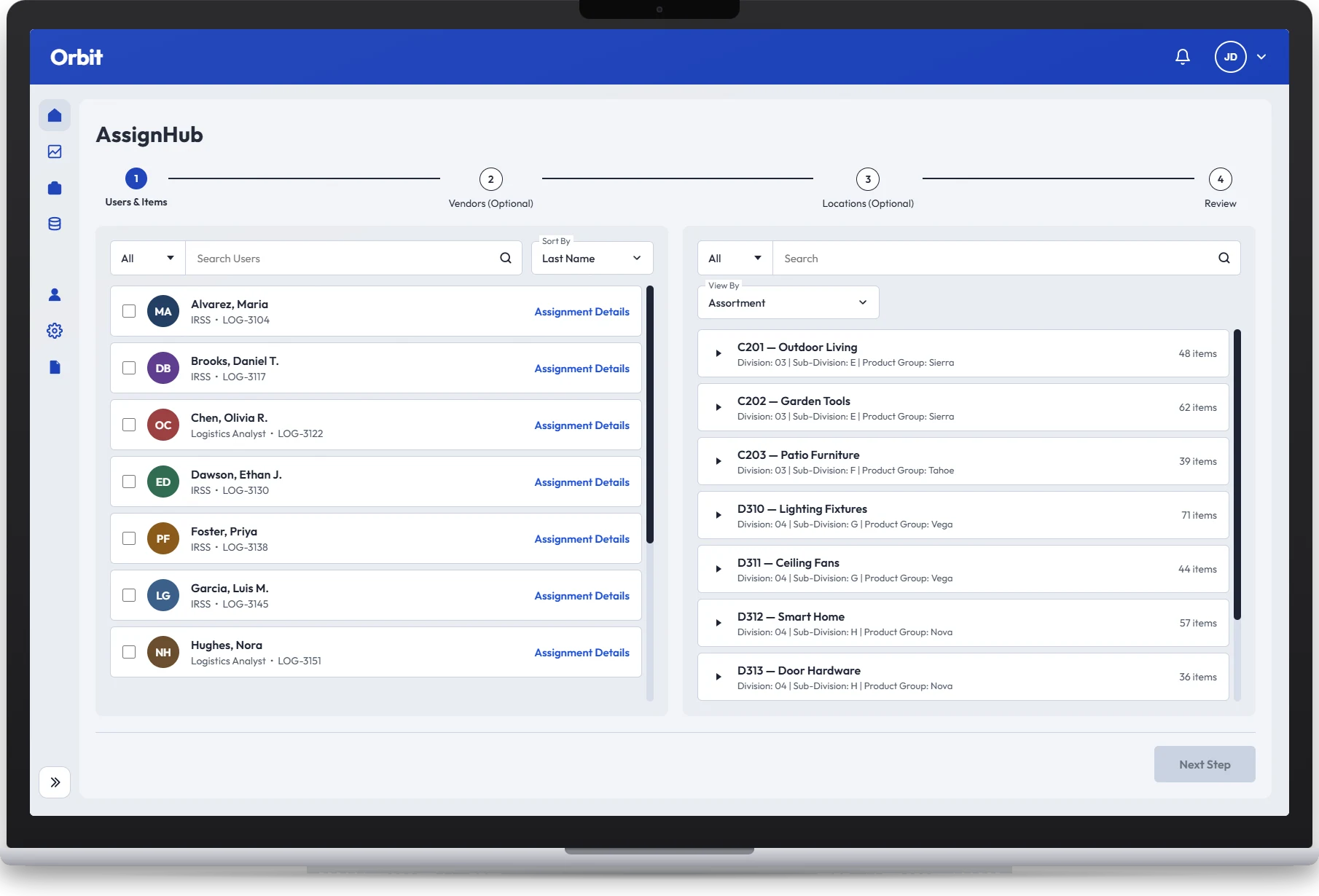
Assign Hub redesign, step 1 of a four-step assignment flow: a searchable list of users on the left and a product hierarchy browsable by assortment on the right, with a stepper for Users & Items, Vendors, Locations and Review (view full size)

Sanitized recreation of the redesigned flow — brand, names and data are illustrative.

walkthrough 1:31 · no audio
Screen recording of the sanitized prototype — brand, names and data are illustrative.

01A workspace, not a dashboard

I made the landing page a place to do the work, not a report to read. People sit on the left, the product hierarchy on the right, and a short guided flow turns a selection into an assignment.

  • Built for the main job. Assign one or more people to one or more parts of the hierarchy, with clear primary and backup roles and a warning before anything gets overwritten.
  • Access matches responsibility. Anyone can look up who owns what, but people can only change assignments for the areas they're responsible for.
  • Reporting lines come from a trusted source. The old tool relied on hand-built manager mappings; the new one pulls the chain of ownership from official people data.
  • Room to grow. Vendors and locations are optional steps, so the first release could focus on the core job while the rest follows.
  • No disruption during the switch. Changes stay in sync with the old system, so teams that still depend on it keep working while everyone moves over.

The result: fast, controlled assignments today, with room to grow as the rest of the old tool's features move over.

Assign Hub landing page: a searchable list of people on the left, the product hierarchy on the right, and a four-step guided flow across the top (view full size)
screen 01 · assignment workspace

02Change only what needs changing

The details drawer opens for one person. It lets someone find that person's items, pick just the ones that need to move, and hand them to someone else, without touching the rest of the hierarchy.

  • One item or many. Checkboxes and Select All handle both a single fix and a bulk move.
  • Find things fast. Search, filters and a View By switch narrow things down from broad categories to specific items.
  • No accidental changes. Save stays off until both the items and a new owner are chosen, and replacing existing owners needs an explicit confirmation.
  • Permissions built in. Some people can only view; others can reassign.
  • Nothing gets orphaned. If someone leaves, their items move to their manager and get flagged, so ownership never quietly disappears.
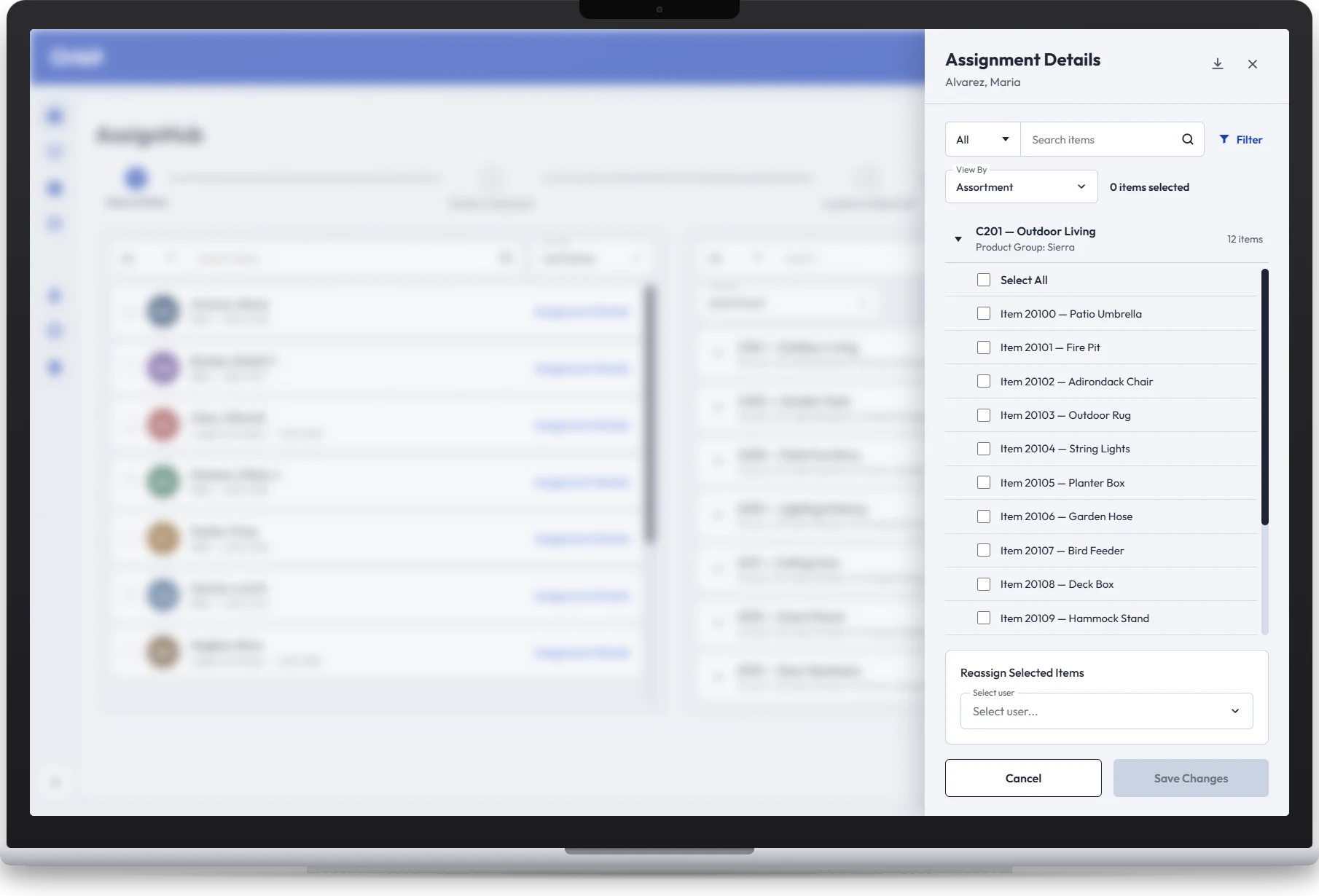
Assign Hub Assignment Details drawer for one person: searchable, filterable item list with checkboxes and Select All, a Reassign Selected Items user picker, and a Save Changes button that stays disabled until items and a user are chosen (view full size)
screen 02 · assignment details drawer

03Answering "who owns this?"

The Assigned Users drawer opens from a single item and shows everyone responsible for it. The goal was to make ownership and coverage visible at a glance, so nobody has to piece the org chart together by hand.

  • The full chain, in one place. Each item shows its assigned owner plus the management chain above them.
  • Teams kept apart. Different teams own items in different ways, so each gets its own section instead of one blended list.
  • Find people by role. Owners are grouped by role, so users can find the right contact even if they don't know the name.
  • Primary and backup, side by side. If someone is out or leaves, the backup and manager fallback keep responsibility visible.
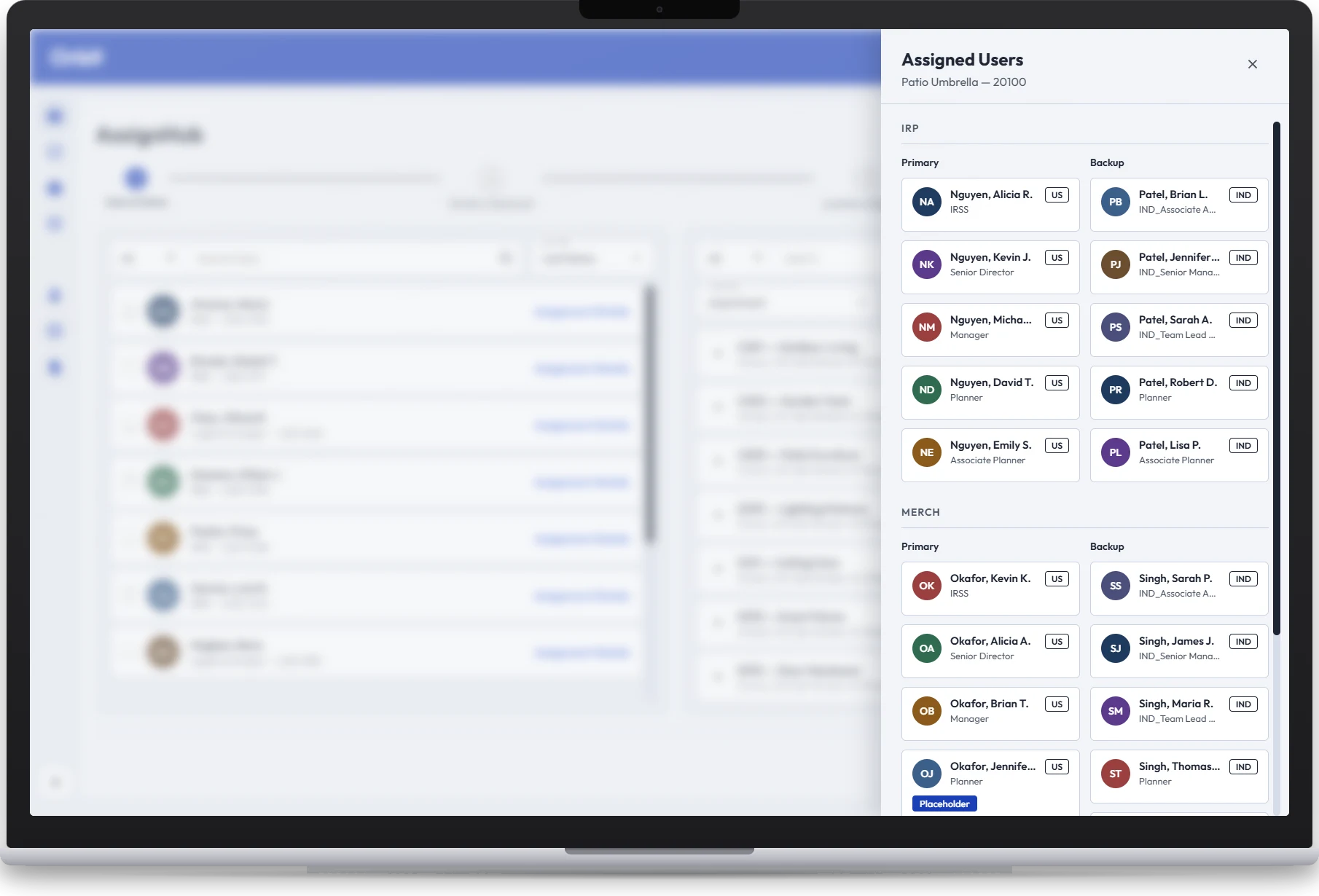
Assign Hub Assigned Users drawer for one item: owners grouped into two team sections, each with Primary and Backup columns of people cards showing name, role and location (view full size)
screen 03 · assigned users drawer

04A deliberate last look

The final step summarizes everything before anyone presses Assign: the person, the items, and any vendors or locations. One click here can change ownership of many records at once, so it should feel like a reviewable transaction, not a quick save.

  • See the impact before it happens. Counts and the exact selections are shown up front, and a warning appears if the change would replace someone's existing ownership.
  • Optional means optional. Vendors and locations only appear in the summary when they were actually chosen, next to the core person-to-product assignment.
  • Clear rules for overlaps. When different kinds of assignment cover the same item, a simple precedence rule decides, so there's never a conflict to untangle later.
  • Built for big selections. Location picks can span many pages and groups; the review confirms the full set before saving.

In short, this screen is the safety check and paper trail for a potentially large ownership change.
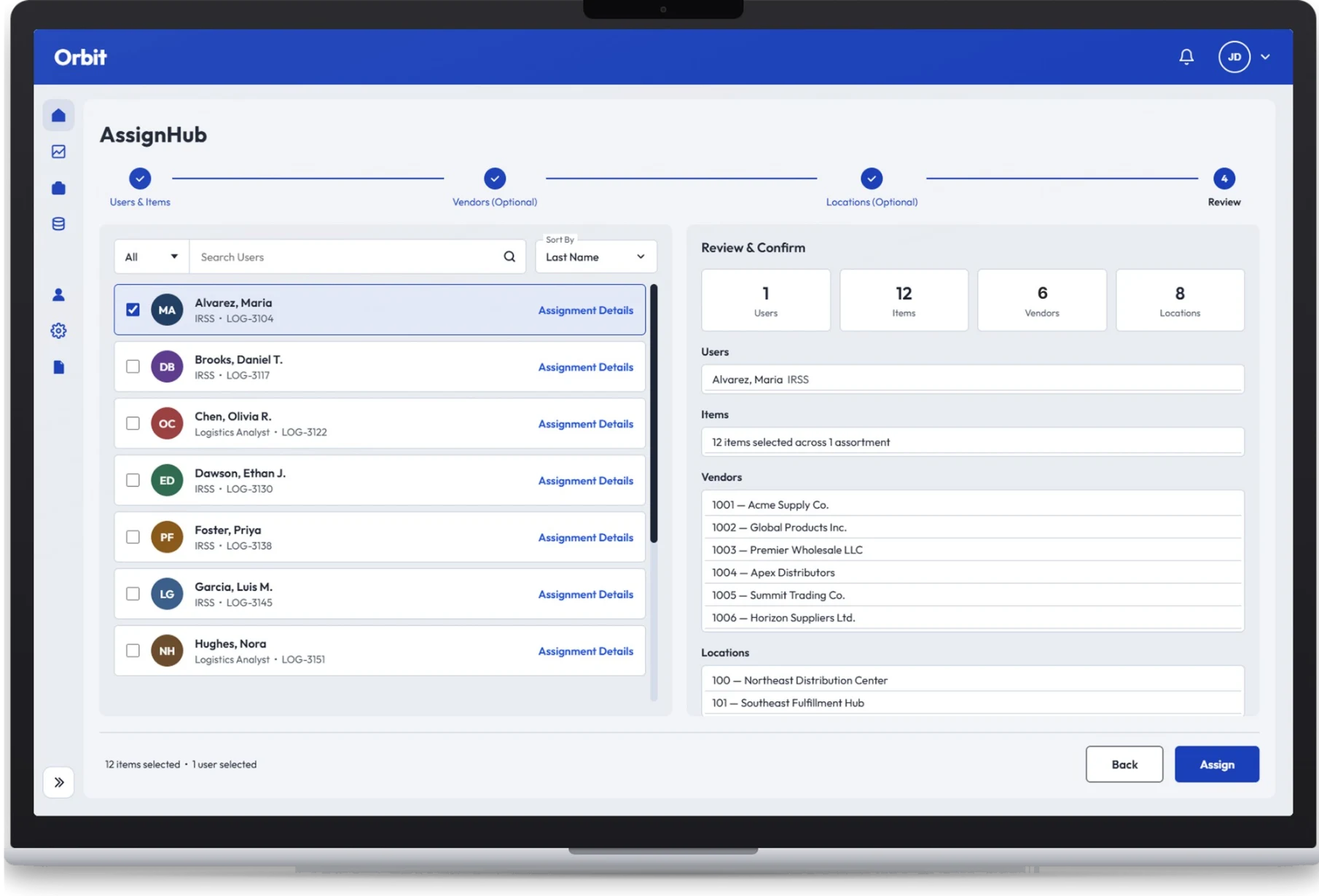
Assign Hub Review & Confirm step: summary counts for users, items, vendors and locations, the full list of each selection, and Back and Assign buttons (view full size)
screen 04 · review & confirm

05What I'd change next

If I took another pass, these are the three changes I'd make first.

  • Always show what's selected. Picking one high-level category can quietly pull in everything beneath it. A running summary next to the main button (how many people, groups and items) would show exactly what's about to be assigned.
  • Separate browsing from selecting. The nested lists do two jobs: open to explore, and check to assign. Those controls should look clearly different and behave the same at every level, so opening something never selects it, and selecting never opens it. That would remove one of the biggest potential sources of mistakes.
  • View first, edit on purpose. The details drawer mixes looking and editing. I'd open it read-only, for checking and filtering someone's assignments, and add a clear Reassign button that switches on the checkboxes and save controls. People who only want to look wouldn't face editing tools they don't need.
Lowe's Internal Enterprise System · 2025

DC Stocking

Deciding where inventory lives: which distribution centers stock which items.

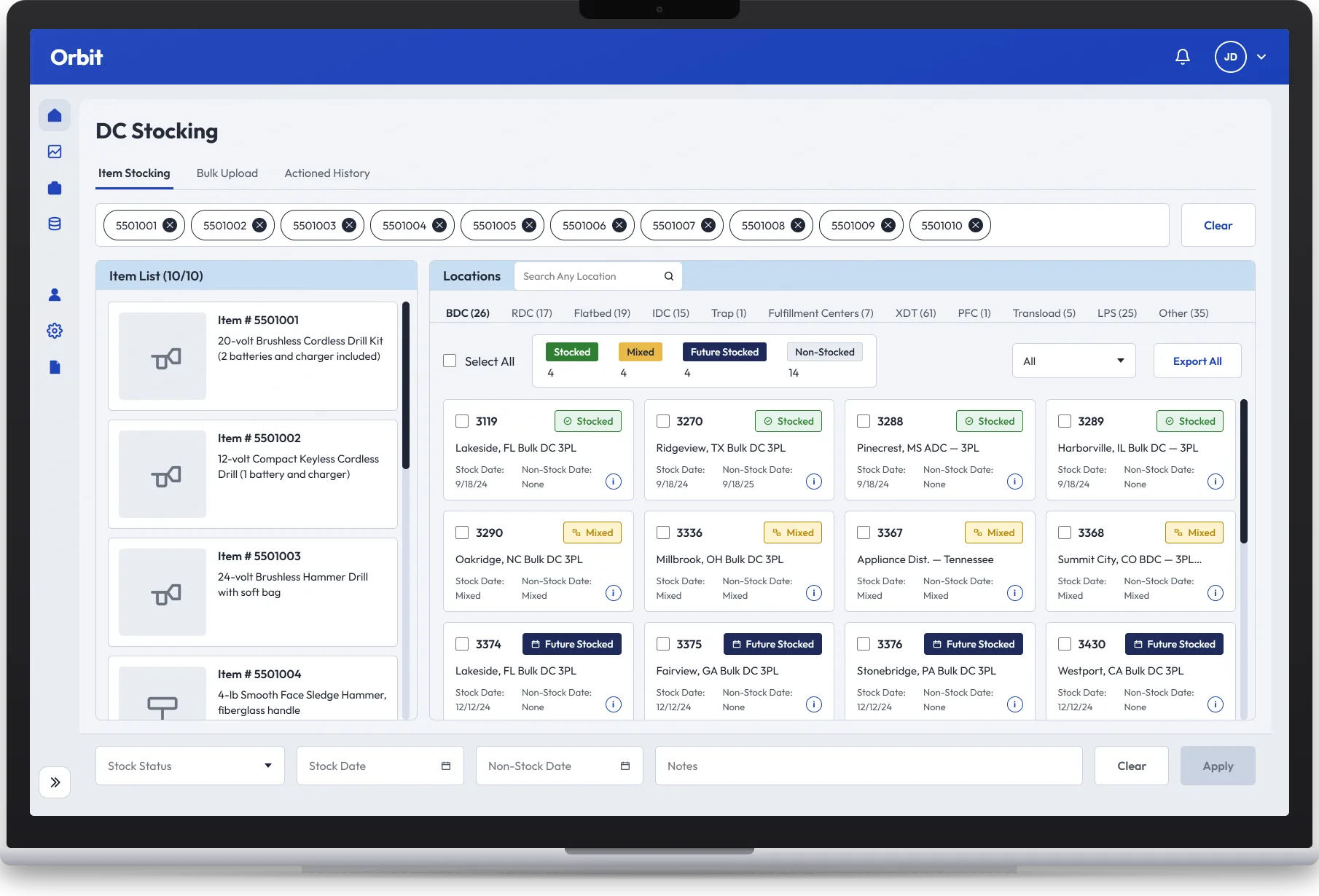
DC Stocking determines whether an item is stocked at a distribution center — the decisions that control which DCs can hold and replenish items for stores. The 20-year-old legacy tool made this item-by-item and painfully manual. I led the end-to-end redesign, including a bulk-upload capability that changed the scale of what users can do.

600 hrs
projected savings per user per year (~3,000 → ~2,400)
~50 min
saved per 100 items with the new bulk upload
10,000
lines supported per bulk-upload file
Role

Owned the end-to-end design process — wireframes through final UI and interactive prototyping. Simplified complex stocking workflows, prioritized the most critical actions, and introduced the bulk-upload experience. Collaborated closely with product and engineering partners through implementation.

Internal Lowe's project — details available in interview settings.

dc_stocking.ui item stocking
DC Stocking redesign: selected items listed on the left, distribution center locations on the right as cards tagged Stocked, Mixed, Future Stocked or Non-Stocked with stock dates, and a bottom bar to set status, dates and notes in bulk (view full size)

Sanitized recreation of the redesigned flow — brand, names and data are illustrative.

Lowe's Internal Enterprise System · 2026

OPS

The system of record for how vendor programs get replenished and ordered.

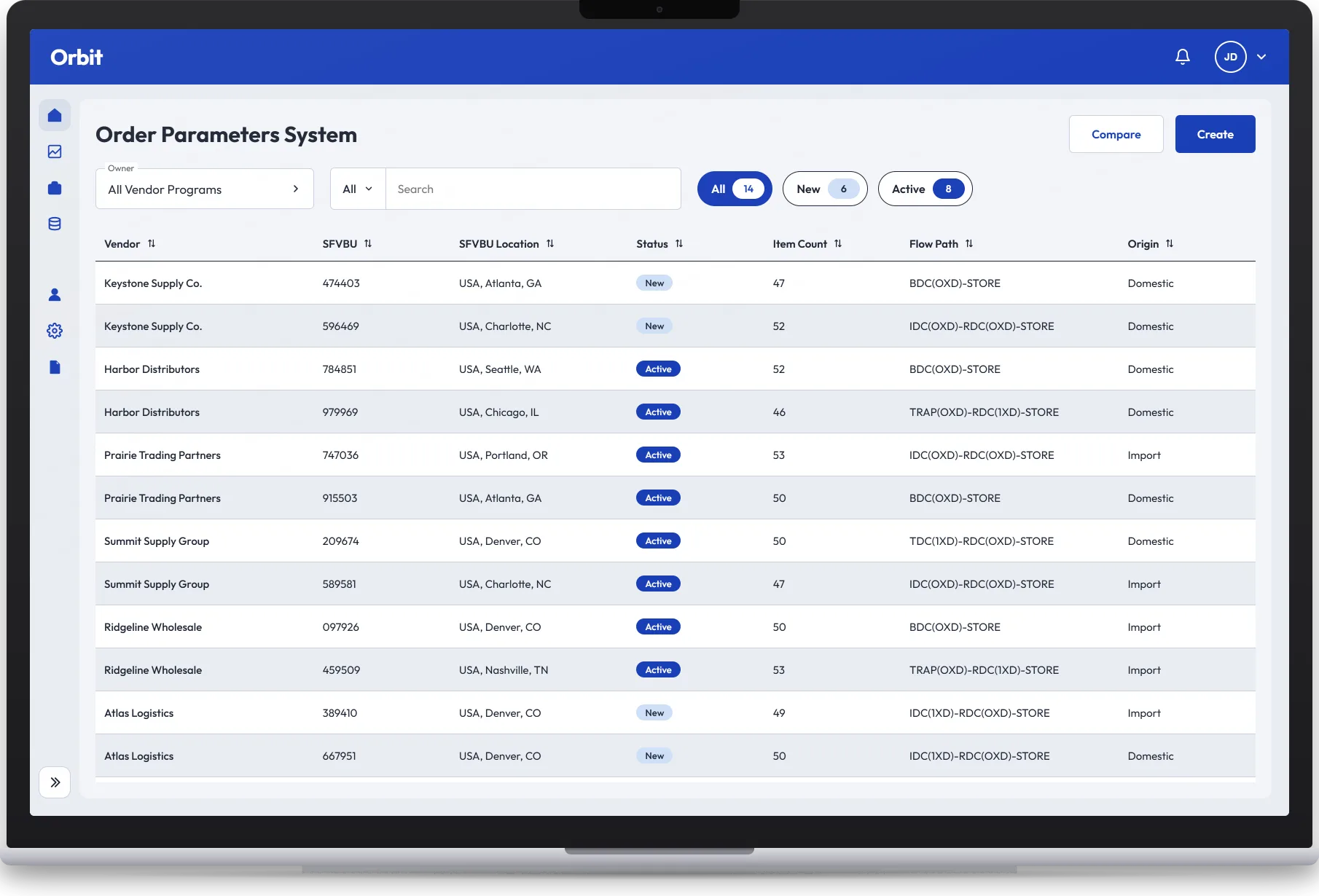
OPS manages the rules and settings that tell downstream systems how every vendor program should be replenished and ordered. Before the redesign, high manual overhead — constant updates, configuration changes, and program proliferation — produced inefficient programs and inaccurate order-parameter recommendations. I led the end-to-end design of the modernized experience.

16,000+ hrs
saved per year through reduced manual setup and faster processing
$1M+
margin opportunity from consolidating vendor programs
~60%
manual inputs cut via LUMOS-driven order-parameter attribution and automated workflows
100% → <5%
manual effort in program setup, via automation
Role

Owned the end-to-end design process — wireframes through final UI and interactive prototyping. Used AI-accelerated exploration (Figma Make) to iterate rapidly. Translated complex replenishment logic and legacy workflows into simplified, intuitive experiences, prioritizing features strategically. Partnered with product and engineering to align designs with business goals and implementation.

Internal Lowe's project — details available in interview settings.

ops.ui vendor programs
Order Parameters System redesign: a filterable table of vendor programs showing vendor, SFVBU, location, New or Active status, item count, flow path and origin, with Compare and Create actions (view full size)

Sanitized recreation of the redesigned flow — brand, names and data are illustrative.

Personal Product Concept · 2026

Dexly

A hybrid skill-barter and gig platform built on the idea that everyone's good at something.

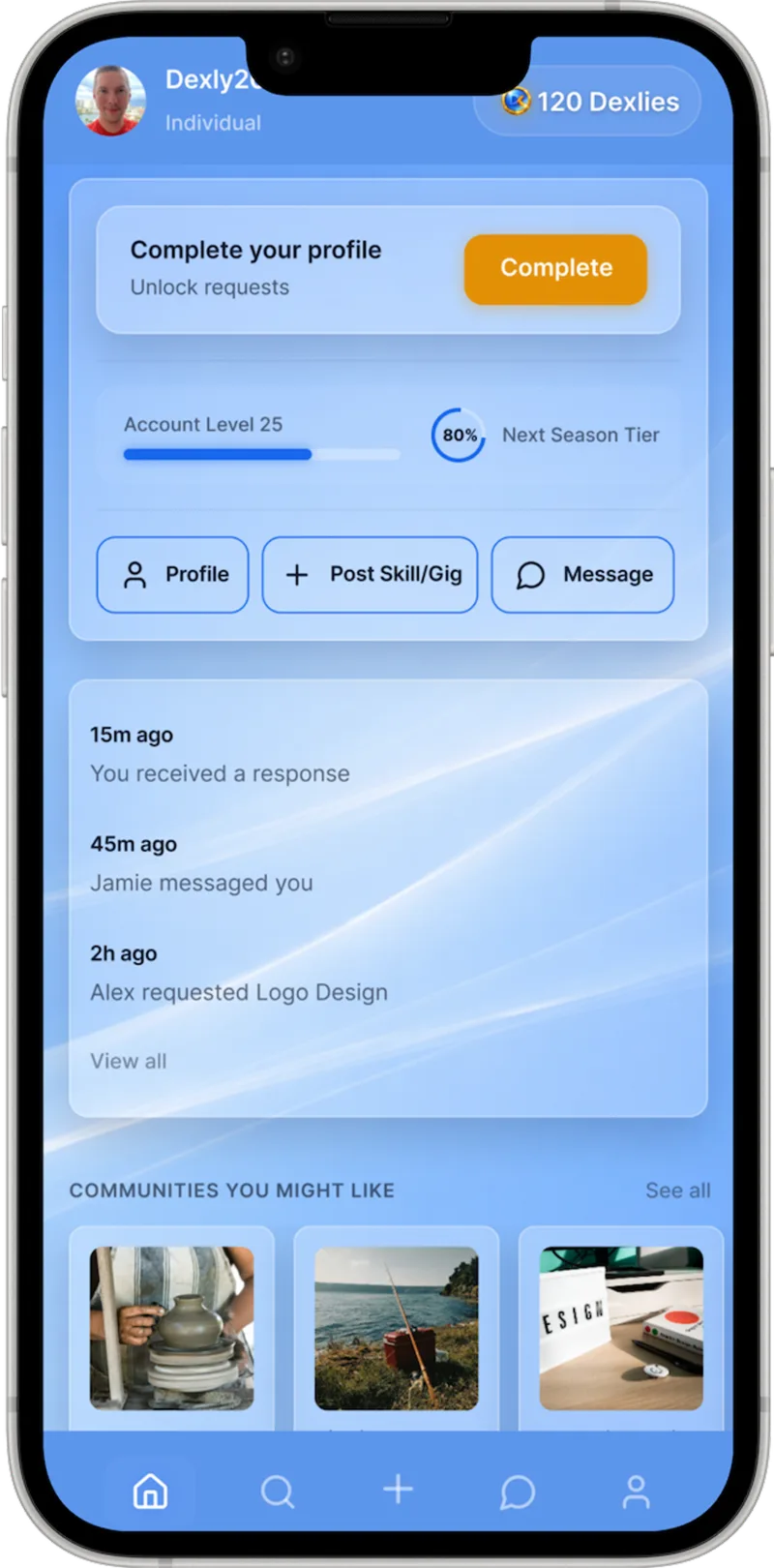
Dexly reimagines the gig economy as a community-driven exchange. Users trade skills through barter, cash, or a flexible mix of both — including an in-app currency, "Dexlies." Gamified systems (Account Levels, activity streaks, seasonal rewards) turn one-time transactions into an ongoing ecosystem of trust and engagement.

Problem

Traditional gig platforms like Fiverr and Upwork are built entirely around money — excluding people with valuable skills but limited resources, and offering little reason to stay engaged beyond the transaction.

Solution

A hybrid marketplace where value flows in more than one direction. Barter, cash, or both; gamified progression that builds credibility; a discovery experience designed around what people can offer each other — not just what they can pay.

Role

Sole designer, end to end — product strategy, UX research (personas, competitive analysis), user flows, high-fidelity UI (glassmorphism visual language), design system and component library, interactive prototyping in Figma Make, gamification and engagement design, accessibility.

View Live Prototype

Active concept — core flows are interactive; some screens are still in design.

Featured screens 04
View Live Prototype

Active concept — core flows are interactive; some screens are still in design.

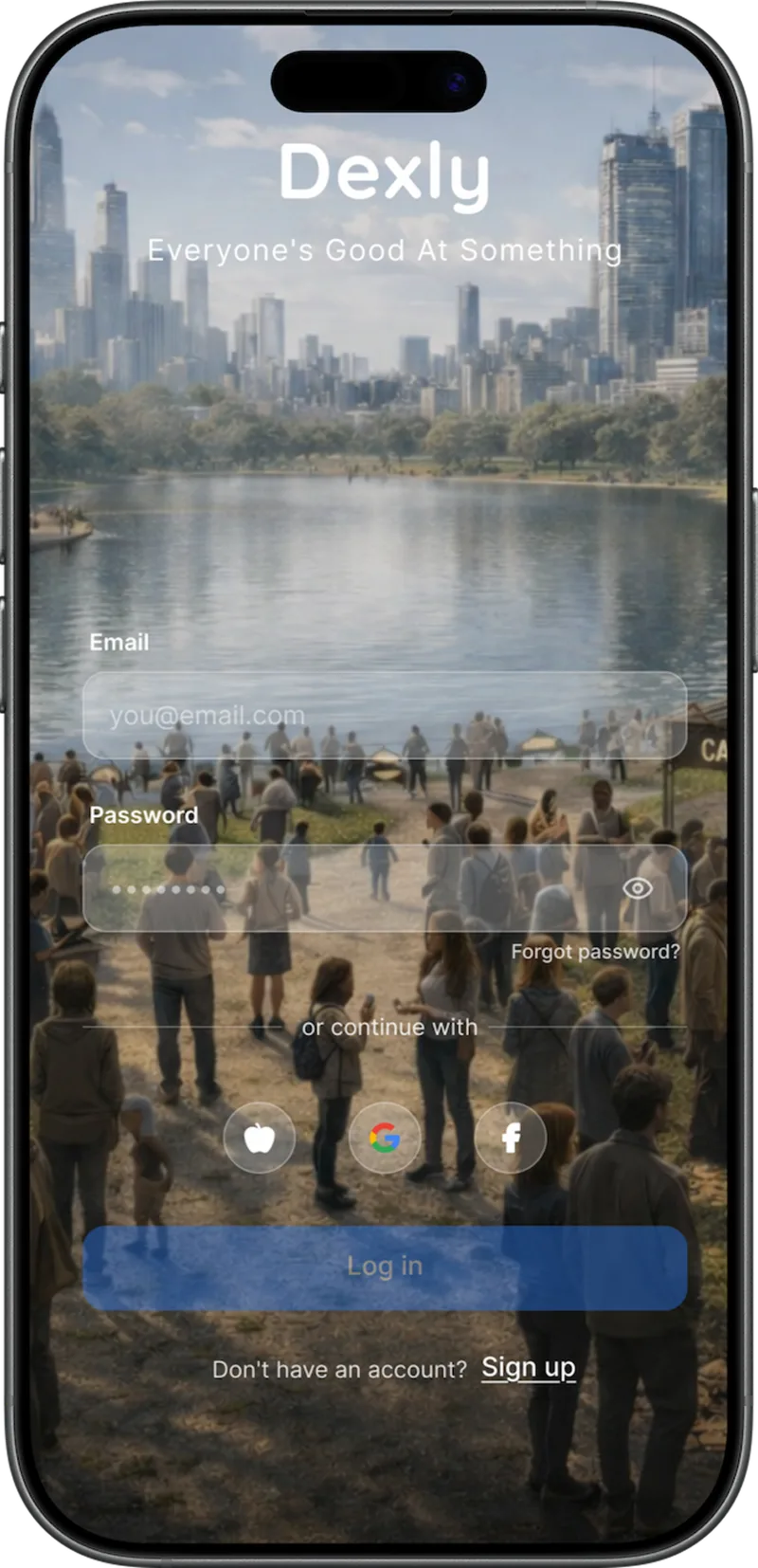
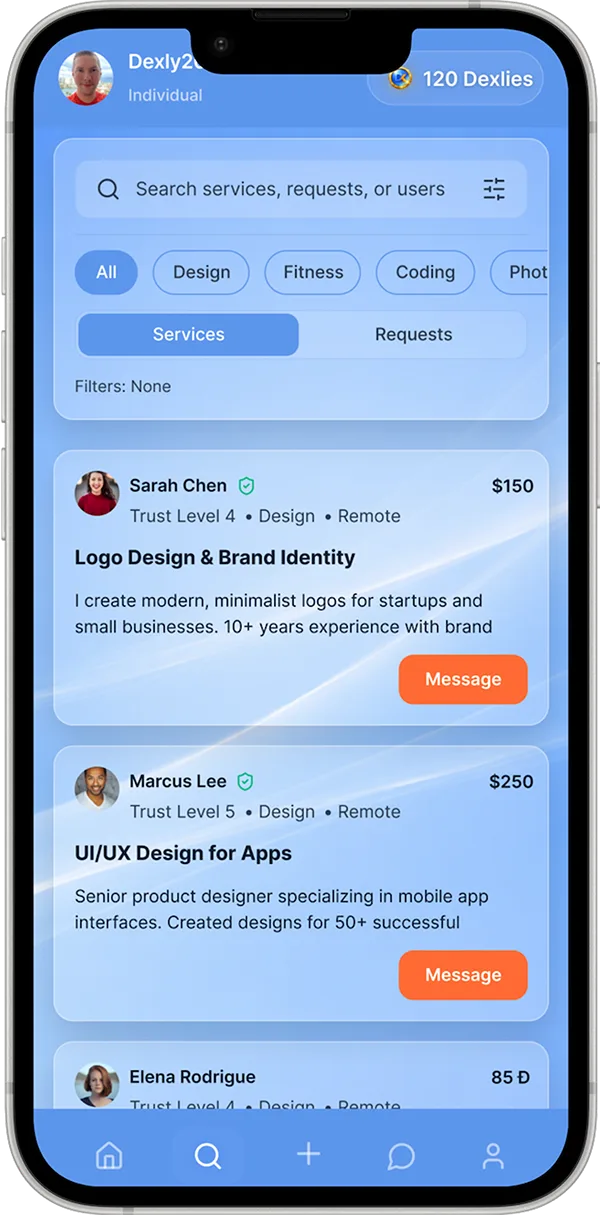
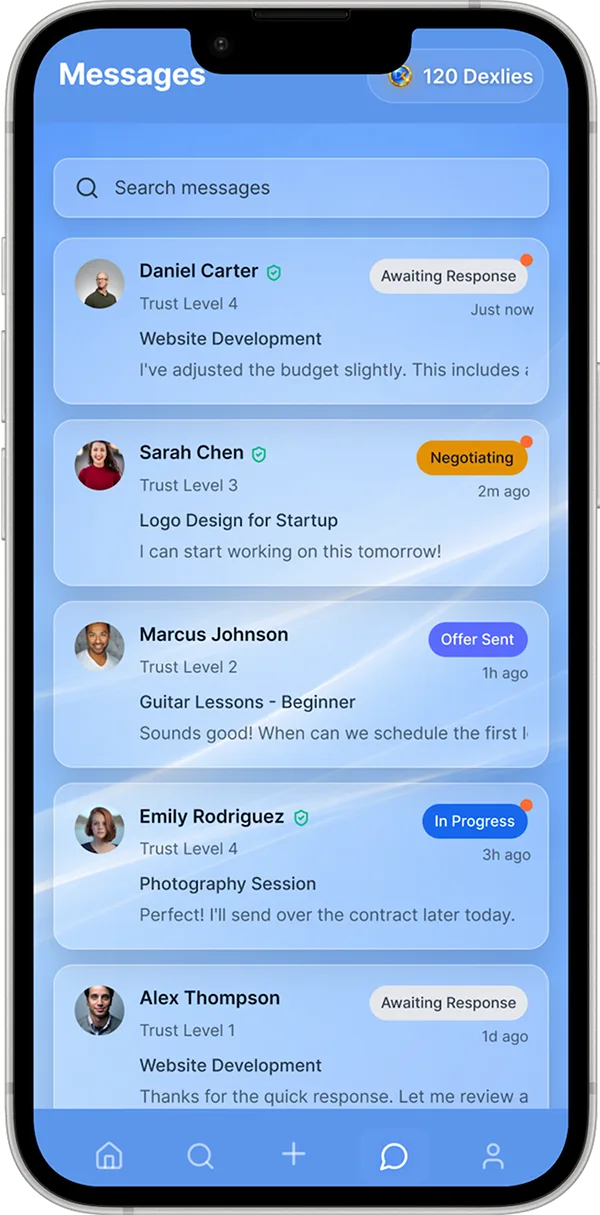
login · homepage · explore · messages — live prototype in Figma Make

01The core bet: hybrid, not pure barter or pure cash

Pure barter was the obvious fix for gig platforms excluding people without money — and it dies on an old economics problem: it only works when two people want each other's skills at the same moment, at the same value. That matching problem is so narrow it kills liquidity before a community can form. Cash-only is just Fiverr — it re-excludes the people I was designing for. So the bet: let value flow in whatever mix works for the two people in the deal. The tradeoff I accepted was complexity — a hybrid negotiation is a harder mental model than a price tag, which is why the messaging and deal-status flows got so much design investment. That's where hybrid deals actually get worked out.

02Why Dexlies exist

Dexlies are the release valve for barter's deadlock: when I want your skill but you don't want mine, an in-app currency lets you accept Dexlies now and spend them on someone else later — value keeps circulating instead of dying in failed matches. They also bridge uneven trades; a logo isn't worth exactly one coaching session. I knew the "funny money" risk going in. My answer to "why not just cash?" is that Dexlies aren't a cash substitute — they're a barter lubricant, and earning them is itself an engagement loop. The honest open problem: tuning that economy (earn rates, spend rates, inflation) needs real usage data.

03Gamification as a trust system

A new marketplace has a cold-start trust problem: no reviews yet, and Dexly's users don't arrive with portfolios — the premise is that everyone's good at something, including people with no professional paper trail. So progression became reputation: Account Levels and streaks are visible, earned evidence that a person shows up and completes exchanges. Reputation built from behavior, not credentials. The line I held: mechanics that reward reliability stay; mechanics that manufacture anxiety go. Levels celebrate accumulation — you can't lose them by taking a week off. Decaying scores and loss-framed streaks would poison the community feeling that differentiates Dexly.

04Explore: browse what people offer, not what things cost

Discovery is organized around offers — card listings with category, payment-type, and location filters — not price-first sorting. Price-first is the Fiverr dynamic: comparison shopping and a race to the bottom. Dexly's browse answers a different question: not "what's cheapest" but "what's out there that I could trade for?" The payment-type filter matters most — someone with no cash can see only the opportunities genuinely open to them. I deliberately skipped an algorithmic feed: at concept stage, a transparent filterable grid tests the core hypothesis better than a black box, and keeps users in a browsing model they already understand.

05What I haven't validated

The biggest unvalidated assumption is liquidity itself: will enough people list barter-open offers and accept Dexlies for the flywheel to spin? Everything downstream depends on it, so it's the first thing I'd test — likely a constrained pilot in one skill community, since a barter economy at low density is just an empty room. Close second: whether hybrid payments explain themselves fast enough in onboarding, or whether three value types overwhelm a first-time user. And the call I'd reverse in hindsight: I built the full gamification suite before validating the core exchange loop. If I restarted, I'd prove people complete one satisfying barter first — engagement systems retain users a core loop has already won.

Section 03 — About

About

I'm Nathan Clinton, a Senior Product Designer based in Charlotte, NC, with 5+ years of experience designing end-to-end — from research and strategy through high-fidelity prototypes.

What I do best is make complex things feel simple. I've spent recent years untangling complex enterprise systems — rebuilding decades-old tools into experiences that are fast, intuitive, and measurably better — and I bring that same clarity-first thinking to consumer and B2B products. The results speak in hours saved, clicks eliminated, and workflows people no longer dread. Projects like Dexly show where I'm headed: marketplace dynamics, engagement loops, and product experiences built for people, not just processes.

My foundation in customer service taught me to truly understand people — and it shows up in every design decision I make. I'm driven by collaboration, continuous improvement, and building products that don't just work well, but feel good to use.

Off the clock

Gaming with friends, golf, the gym, traveling, new foods and breweries, hiking, sports, movies, and music. Friends describe me as patient, kind, and generous — qualities I bring to my work, too.

Section 04 — Contact

Let's build something.

Open to product design opportunities and always up for talking shop.

NathanMClinton@gmail.com